A question Malaysian contractors, engineering firms, and industrial SME owners frequently ask is: "We already use accounting software like SQL Account or AutoCount. Why would we need procurement software?"
It is a fair question. Popular Malaysian accounting platforms already include purchasing features. SQL Account offers Purchase Request, Goods Received, and document approval modules. AutoCount includes purchase requisition and GRN capabilities.
Yet, despite having these modules installed on office computers, companies still find their purchasing running on WhatsApp messages, paper requisition forms, and loose delivery orders.
The reason is simple: accounting software and procurement software solve fundamentally different problems.

The Core Difference: The Ledger vs The Buying Process
The clearest way to understand the distinction is looking at when each system operates:
- Accounting software is the financial ledger. Its job is to maintain the general ledger, track accounts payable, calculate SST, manage bank reconciliations, and produce balance sheets and tax returns. It records what has already happened financially.
- Procurement software controls the buying before the bill exists. Its job is to manage the operational journey: someone requesting materials on site, comparing supplier quotations, verifying project budgets, getting manager approvals on a mobile phone, recording physical deliveries at the site yard, and matching invoices to what arrived.
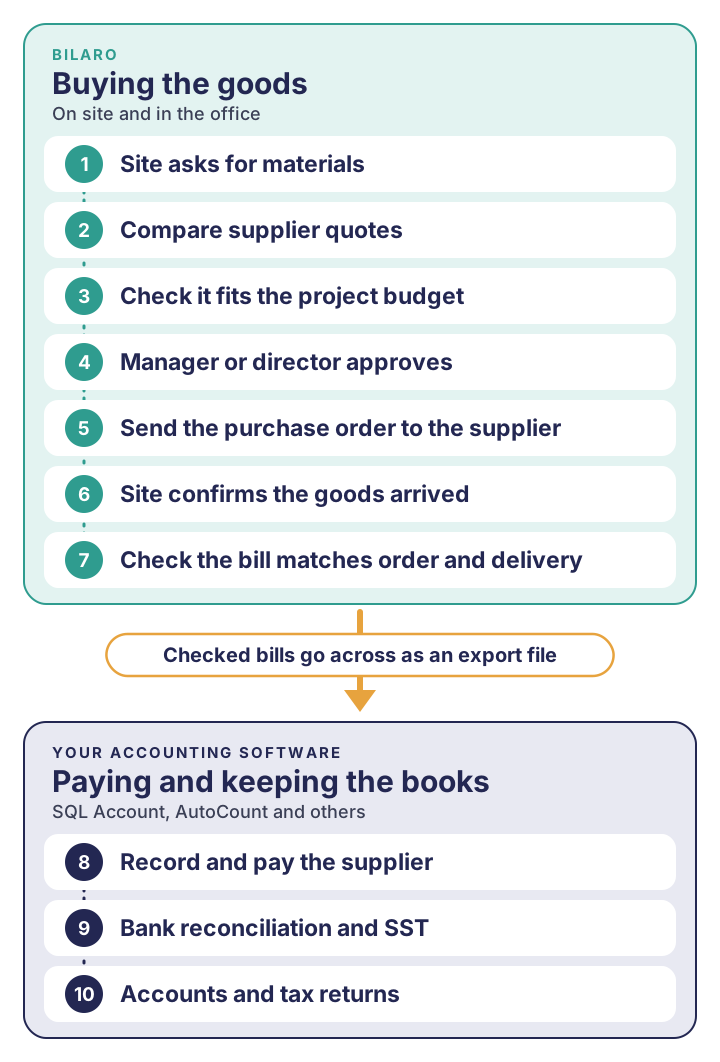
Bilaro looks after the buying. Your accounting software still keeps the books.
When Accounting Software Alone Is Enough
For certain businesses, standard accounting software meets all purchasing requirements without adding extra tools:
- Single office location: The entire team works under one roof, with no remote job sites, regional workshops, or scattered yards.
- Few purchasing individuals: Only one or two designated office staff place orders.
- Direct owner approval: The business owner or finance manager reviews every invoice directly before signing cheques or releasing payments.
- Low purchasing volume: Orders are infrequent, items are simple, and deliveries arrive straight to the central office.
In this setup, buying is straightforward. The accounts department can enter purchase documents directly into the desktop accounting system.
When Accounting Software Alone Isn't Enough
As a company grows, runs multiple project sites, or employs field teams, relying solely on accounting software creates friction:
1. Site teams do not work at an office desk
Jurutera tapak, site supervisors, and storekeepers work on construction sites, fabrication yards, and remote locations. They do not have access to office accounting software, nor should they have access to the general ledger. As a result, site requests happen through WhatsApp chats, photos of written notes, or ring-bound books that office clerks must manually re-type.
2. Multi-tier approvals by project budget

3. Comparing supplier quotations

4. Receiving happens in the field, not at the accounts desk

5. Desktop licensing and segregation of duties
Accounting software licences are typically priced per seat and installed on office computers. Giving every site engineer and project manager an accounting user account is costly and risky. Segregation of duties requires that operational staff request materials, managers approve, site teams receive, and finance pays.
How Bilaro Works Next to Your Accounting Software
Bilaro bridges the gap between field operations and the finance office for Malaysian contractors and industrial SMEs:
- Requisitions start on site: Staff raise structured purchase requisitions on their mobile phones, tagging project codes and attaching supplier quotes.
- Budget-aware mobile approvals: Requests route through an approval matrix. Managers and directors can review and approve purchases from a phone browser, with clear warnings if project budgets are tight.
- Official PO generation: Approved requests become professional POs generated through a dedicated purchase order system, issued by Finance or Admin, with an optional four-eyes rule so the approver cannot also issue the PO.
- Mobile goods receiving: Site personnel record deliveries on the spot using goods received note software, logging accepted counts and flagging damages.
- Three-way matching: When the supplier invoice arrives, finance performs three-way matching against the PO and site GRN on one clear audit trail.
- Export files for accounting: Once an invoice is matched and approved, Bilaro generates export files formatted for direct import into SQL Account and AutoCount, as well as a generic CSV for other systems. Finance imports the verified bills into their accounting software without manual data entry errors.
By letting Bilaro control the operational purchasing workflow and letting accounting software manage the ledger, businesses eliminate rogue spending, maintain budget discipline, and free finance from manual data entry.
Does procurement software replace my accounting software?
No. Procurement software manages the process of buying: requesting, approving, ordering, receiving, and verifying. Accounting software remains the central system of record for the general ledger, payments, tax, and financial reporting. They complement each other.
Don't systems like SQL Account and AutoCount already have purchase orders?
Yes. Both SQL Account and AutoCount include purchase order, requisition, and receiving modules. However, those modules are primarily designed for office-based accounting staff. They do not easily support field teams submitting mobile requests from site, mobile goods receipt notes with photo evidence, or multi-site quotation comparisons.
Why should site staff not use the accounting software directly?
Giving site supervisors and field staff direct access to accounting software introduces financial security risks, requires expensive desktop user licences, and exposes sensitive company-wide accounting data. Procurement software provides role-based access where site staff can only request and receive items relevant to their assigned projects.
How does procurement data move from Bilaro into accounting software?
Bilaro exports approved bills into structured files formatted specifically for SQL Account and AutoCount, as well as generic CSV files. Your finance team imports these files into your accounting software to update accounts payable, eliminating the need to re-key invoice data manually.
When is a business ready for dedicated procurement software?
A company typically needs procurement software when it runs multiple concurrent project sites, when purchasing involves multiple approvers across different spending thresholds, or when finance struggles to match supplier invoices with physical delivery records from the field.
Put your procurement on the record.
Bilaro links requisitions, approvals, purchase orders, and your vendor register in one audit-ready system, built for Malaysian construction and O&G teams. Free plan for 2 users, no card needed.